
Choosing between QuickBooks and Xero becomes easier when you replace a long feature checklist with the work your business does every week. For a service company, that might mean invoicing clients, assigning job costs, reconciling accounts, and sharing records with an accountant.
Both products support cloud accounting. The useful question is which local edition and subscription fit your process with fewer adjustments.
Start with the accounting work
QuickBooks Online combines invoicing, expenses, and reporting, with project-costing features available in supported plans. Xero also provides invoicing, accounting reports, and bank reconciliation, with additional capabilities determined by the local plan.
Neither product makes incomplete records dependable automatically. Receipts, transaction classifications, and opening balances still need attention.
Before comparing subscriptions, list your required users, reporting needs, payment connections, and any separate payroll or time-tracking products.
Compare the tasks that matter
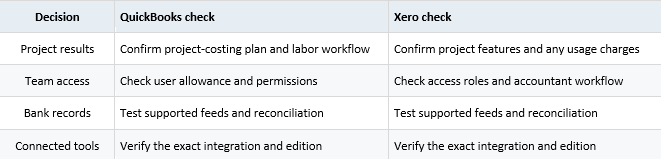
This is an evaluation framework, not a claim that every listed function is identical across plans.
Run the same small trial
Imagine a consulting company with three active projects. This hypothetical team can test the same customer invoice, supplier expense, account transfer, and project report in each system.
Have the person doing the bookkeeping complete the trial. Record where information must be entered twice, which reports require additional work, and whether another colleague can understand the results.
Include an awkward transaction, such as a partial payment or refund. Those cases often reveal more than a polished demonstration.
Decide from the whole cost
Compare the ongoing subscription after any introductory discount, optional services, payment fees, and migration effort. A lower subscription can become more expensive if it introduces recurring manual work.
QuickBooks deserves a close look when its project reporting and your accountant’s existing workflow align with your needs. Xero deserves a close look when its accounting workflow, access arrangements, and connected tools suit the team.
Make the final choice from a tested workflow and a local feature comparison. The better system is the one your business can maintain accurately as its transactions and responsibilities grow.