For a small business, accounting is rarely just about balancing the books. It is about knowing whether the company is actually making money, understanding what customers owe, controlling expenses, staying compliant, and making decisions before a cash-flow problem becomes a crisis.
That is where Xero has carved out a significant position.
Xero is a cloud-based accounting platform designed primarily for small and growing businesses and the accountants and bookkeepers who serve them. Rather than treating accounting as a once-a-month administrative exercise, the platform aims to turn financial data into an always-available view of business performance.
But is Xero worth the investment? How does it compare with alternatives such as QuickBooks Online? And what should business owners know before moving their finances to the cloud?
This guide takes a closer look.
What Is Xero?
Xero is an online accounting software platform founded in New Zealand in 2006. Unlike traditional desktop accounting software, Xero operates primarily through the cloud, allowing authorized users to access financial information through an internet-connected device.
Its core functions include:
Invoicing and accounts receivable
Bills and accounts payable
Bank transaction reconciliation
Expense management
Financial reporting
Payroll in supported markets
Inventory-related accounting
Tax and sales-tax/GST/VAT functionality, depending on jurisdiction
Integration with third-party business applications
Collaboration between businesses, accountants and bookkeepers
The central proposition is straightforward: business financial information should be accessible, current and connected rather than trapped in spreadsheets or isolated desktop systems.
Xero at a Glance
FeatureXeroCategoryCloud accounting softwareFounded2006HeadquartersWellington, New ZealandPrimary audienceSmall businesses, accountants and bookkeepersDelivery modelCloud/SaaSCore functionsAccounting, invoicing, bills, reconciliation, reportingBank feedsYes, availability depends on financial institution/marketThird-party integrationsExtensive ecosystemMobile accessYesMulti-user collaborationYes, subject to plan/permissionsInternational availabilityMultiple markets, with features varying by country
Note: Pricing, tax features, payroll availability and specific functionality vary by market and subscription plan.
Why Xero Matters to Small Businesses
Accounting software used to be largely retrospective. A business might send invoices, record expenses and reconcile accounts at the end of the month before producing a set of financial statements.
Cloud accounting changed that model.
With bank feeds, automated transaction matching and continuously updated reports, platforms such as Xero can reduce the gap between what happened financially and when the business owner finds out about it.
That distinction matters.
Imagine a company with $100,000 in annual revenue but consistently slow-paying customers. On paper, revenue may look healthy. In reality, the company could still struggle to pay suppliers, employees or taxes.
A modern accounting platform can help management monitor:
Revenue → Receivables → Cash → Expenses → Profit
That chain is more useful to an entrepreneur than a year-end profit figure viewed in isolation.
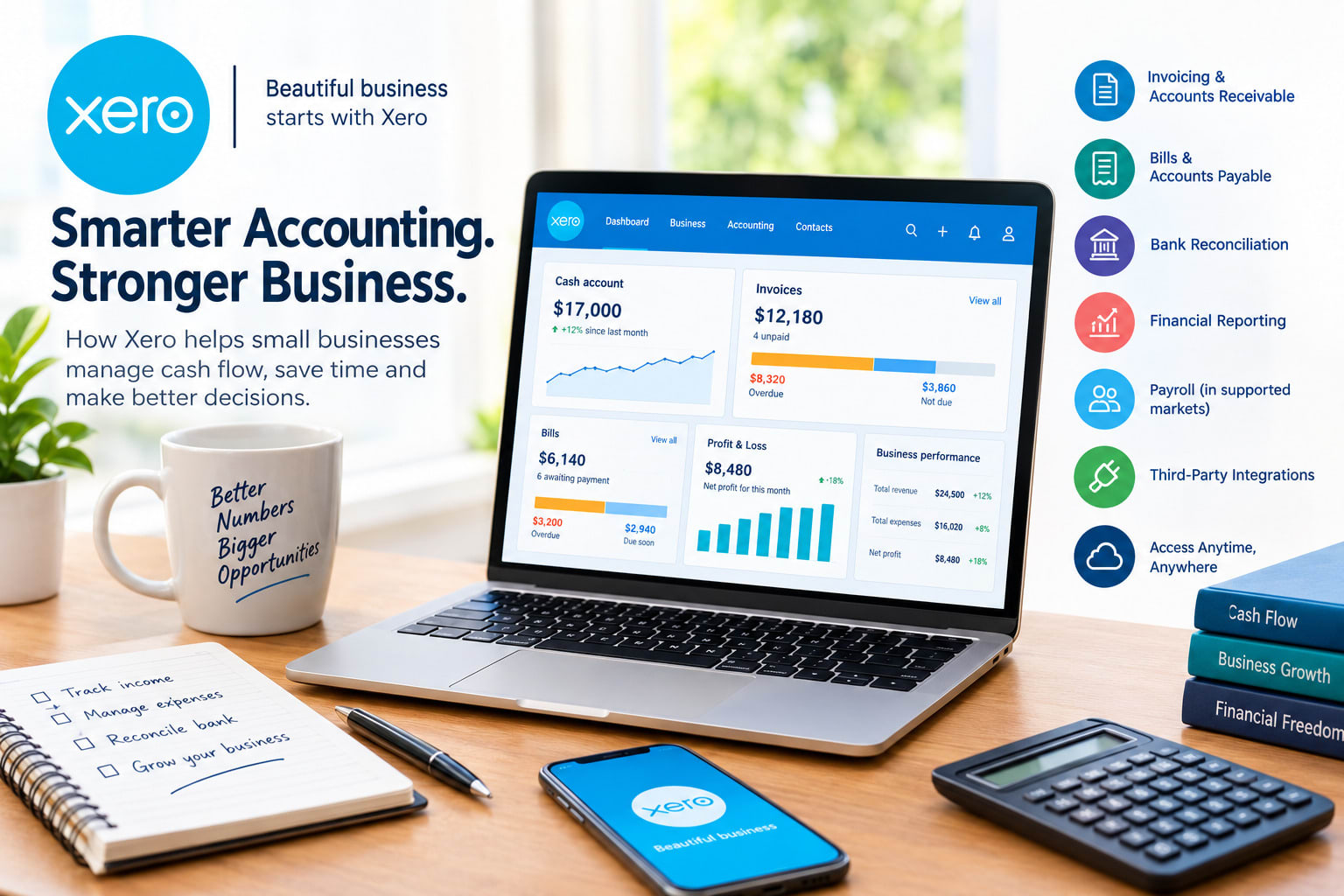
The Xero Dashboard: Turning Numbers Into a Business View
One of Xero's strengths is its emphasis on presenting accounting information in a form that business owners can use without being professional accountants.
Depending on the user's setup, the platform can provide visibility into areas such as:
Cash balances
Outstanding invoices
Bills awaiting payment
Recent transactions
Account reconciliation
Key financial reports
The real value, however, comes from connecting those individual functions.
For example, an unpaid customer invoice is not merely an accounting entry. It represents money that the business has earned but does not yet have in its bank account.
That makes accounts receivable a cash-flow issue, not just a bookkeeping issue.
Xero's Core Features
1. Online Invoicing
Creating and tracking invoices is one of the most fundamental functions of accounting software.
Xero allows businesses to create professional invoices, send them to customers and monitor outstanding amounts.
For service businesses in particular, this can remove a surprising amount of administrative work.
Example
Suppose a consulting company sends 50 invoices every month.
Without accounting automation:
Create invoice → Send email → Record transaction → Check payment → Update spreadsheet → Reconcile bank
With an integrated accounting workflow:
Create invoice → Send → Payment arrives → Match transaction → Accounts update
The difference becomes significant as transaction volume increases.
2. Bank Reconciliation
Bank reconciliation is one of the most important accounting processes—and one of the easiest places for manual bookkeeping to become inefficient.
Xero can connect eligible bank accounts and import transactions, allowing users to match bank activity against invoices, bills and other accounting records.
Why reconciliation matters
Consider this simplified example:
ItemAmountOpening cash balance$20,000Customer payments+$35,000Supplier payments-$18,000Payroll-$15,000Taxes and other costs-$5,000Closing cash$17,000
Revenue might have increased during the period, yet the company could still have less cash than it started with.
Reconciliation helps management distinguish between accounting activity and actual bank movements.
3. Accounts Payable and Bills
Cash management isn't only about collecting money. It is also about controlling outgoing payments.
Xero can help businesses record bills, organize payment obligations and monitor what is owed to suppliers.
This creates an important management advantage: owners can see upcoming financial commitments instead of discovering them when a supplier sends a reminder.
A simple working-capital picture
MetricMeaningWhy It MattersAccounts receivableMoney customers oweIndicates potential future cashAccounts payableMoney owed to suppliersIndicates upcoming cash requirementsCash balanceMoney currently availableMeasures immediate liquidityInventoryCapital tied up in stockCan affect working capitalOperating expensesCost of running the businessDrives cash outflows
The objective is not simply to maximize cash.
It is to maintain sufficient liquidity while using capital efficiently.
4. Financial Reporting
Good accounting software should do more than record transactions. It should help management understand them.
Xero provides access to financial reports such as:
Profit and loss statements
Balance sheets
Cash-flow information
Aged receivables
Aged payables
Account transactions
Budget-related reporting, depending on functionality and configuration
These reports can answer fundamental questions:
Is the company profitable?
Are margins improving?
Which customers owe money?
Are expenses growing faster than revenue?
How much cash is available?
The answers can influence everything from hiring decisions to pricing strategy.
5. Expense Management
Small businesses often underestimate the cumulative impact of minor expenses.
A $20 subscription may seem irrelevant. Multiply it by dozens of software subscriptions, payment fees, travel costs, bank charges and miscellaneous purchases, and the picture changes.
Expense management helps businesses capture and categorize these transactions so management can understand where money is going.
Illustrative monthly expense breakdown
Expense CategoryMonthly CostPayroll$25,000Rent and utilities$5,000Software$2,500Marketing$4,000Professional services$2,000Travel$1,500Other operating expenses$3,000Total$43,000
A business that monitors these figures consistently has a better chance of identifying cost creep before it becomes structural.
6. Integrations: Where Xero Becomes More Powerful
One of the most important characteristics of modern accounting platforms is that they do not have to operate alone.
Businesses often use separate systems for:
Payroll
Payments
E-commerce
Point-of-sale
Inventory
Customer relationship management
Expense management
Project management
Business banking
Connecting these systems can reduce duplicate data entry and create a more integrated financial workflow.
The result can look like this:
Sales system
↓
Payment processing
↓
Xero
↓
Bank reconciliation
↓
Financial reporting
This ecosystem approach is a major reason cloud accounting platforms have become central to small-business technology stacks.
Xero vs. Traditional Spreadsheet Accounting
Spreadsheets are not inherently bad.
For a very small operation with a handful of transactions, a spreadsheet can be inexpensive and flexible.
The problem emerges as complexity increases.
RequirementSpreadsheetXeroBasic calculationsExcellentExcellentAutomated bank feedsLimited/manualYesInvoice trackingManualBuilt inMulti-user collaborationPossibleDesigned for itAudit trailLimited depending on setupStronger accounting workflowAutomated reconciliationLimitedYesScalabilityDeclines with complexityDesigned to scaleFinancial reportingManual setupBuilt-in reportsIntegration ecosystemExternal/manualExtensiveRisk of version conflictsHigherLower
The key question isn't whether spreadsheets can perform accounting tasks.
They can.
The question is whether they remain the most efficient and controlled system as the business grows.
Xero vs. QuickBooks Online
Xero and QuickBooks Online are two of the best-known cloud accounting platforms serving small and medium-sized businesses.
Neither is universally "better." The right choice depends on the company's location, industry, accountant, integrations, pricing and preferred workflow.
FactorXeroQuickBooks OnlineCloud accountingYesYesInvoicingYesYesBank feedsYesYesFinancial reportingStrongStrongThird-party integrationsExtensiveExtensiveAccountant collaborationStrongStrongInternational presenceStrongStrongUser experienceClean, workflow-orientedBroad feature setBest fitBusinesses wanting connected cloud accountingBusinesses wanting a mature all-round accounting ecosystem
Pricing and features change over time and vary significantly by country, so businesses should compare their local plans and current feature sets, rather than relying on an old global pricing comparison.
How Much Does Xero Cost?
This is one area where potential buyers should be careful.
Xero does not have one universal price for every customer worldwide. Subscription tiers, included features, payroll availability, transaction limits and pricing can differ by country and may change over time.
Therefore, the more useful way to evaluate the cost is to consider total accounting value, rather than simply the monthly subscription.
Illustrative cost-benefit framework
Cost/BenefitManual AccountingCloud AccountingSoftware subscriptionLowHigherManual data entryHighLowerReconciliation timeHighLowerReporting effortHighLowerCollaborationLimitedStrongScalabilityLimitedStrongAutomation potentialLowHighVisibilityPeriodicMore continuous
A $30–$100 monthly software expense may look significant to a tiny business. But if the platform saves several hours of bookkeeping every month—or prevents a costly accounting error—the economic calculation can change quickly.
The Real ROI of Xero
The strongest argument for accounting software isn't convenience.
It is decision quality.
Suppose a business owner has three possible uses for $50,000:
Hire another employee
Purchase inventory
Invest in marketing
Without reliable financial information, the decision may be based largely on intuition.
With current accounting data, management can examine:
Gross margin
Cash runway
Outstanding receivables
Upcoming bills
Revenue trends
Operating expenses
Historical profitability
The software doesn't make the decision.
It makes a better-informed decision possible.
Xero's Advantages
1. Cloud Accessibility
Authorized users can access financial information without being tied to a particular office computer.
For business owners, accountants and distributed teams, this is a major advantage.
2. Automation
Bank feeds, transaction matching, recurring invoices and other automation features can reduce repetitive bookkeeping.
3. Accountant Collaboration
Cloud accounting allows business owners and professional advisers to work from connected financial information rather than passing files back and forth.
4. Ecosystem
The ability to connect accounting with other business systems can reduce fragmented workflows.
5. Scalability
Xero can be useful when a business moves beyond basic bookkeeping and needs more sophisticated financial processes.
Where Xero May Fall Short
No accounting platform is perfect.
Cost
As a business adds users, features, integrations or related services, the total technology cost can increase.
Learning Curve
Although designed to be accessible, accounting software still requires users to understand basic accounting concepts.
Automation does not eliminate the need for good financial controls.
Dependence on Accurate Data
A sophisticated accounting system can still produce misleading reports if transactions are categorized incorrectly or accounts are not reconciled properly.
Internet Dependence
Because Xero is cloud-based, reliable internet access is part of the operating requirement.
Regional Differences
Features such as payroll, tax functionality, payment options and banking integrations can vary between countries.
Is Xero Suitable for Small Businesses?
For many small businesses, yes—but suitability depends on the company's complexity.
Xero is particularly attractive for businesses that:
Issue regular customer invoices
Have multiple bank transactions
Need professional financial reports
Work with an accountant or bookkeeper
Want to automate reconciliation
Use multiple business applications
Expect to grow
A very small business with only a few transactions per month may not need a sophisticated accounting platform.
But once transaction volume, employees, customers and suppliers increase, the value of automation generally becomes more compelling.
Xero for Accountants and Bookkeepers
Xero's business model is also notable because accountants and bookkeepers are not merely peripheral users.
They can become an important part of the platform's ecosystem.
Instead of receiving accounting records periodically, an accountant can work with a client's cloud-based books as part of an ongoing relationship.
That changes the traditional accounting workflow from:
Business records → Accountant → Report
to something closer to:
Business + Accountant → Shared financial system → Continuous oversight
This creates opportunities for accountants to move beyond compliance and provide more advisory services.
Security: What Should Businesses Consider?
Financial software inevitably raises security questions.
Businesses should consider:
Strong passwords
Multi-factor authentication where available
User permissions
Regular review of authorized users
Secure devices
Staff cybersecurity training
Careful management of third-party integrations
Regular review of bank and accounting activity
Cloud security is not simply a software-provider issue.
It is also a user-behavior issue.
A secure platform can still be compromised by weak credentials, phishing or poor access controls.
Xero and Business Cash Flow
Perhaps the most important lesson for entrepreneurs is that profit is not the same as cash.
Consider this example:
ItemAmountSales$100,000Cost of goods sold-$40,000Gross profit$60,000Operating expenses-$35,000Accounting profit$25,000Customer invoices still unpaid$30,000
The company can report a $25,000 profit while waiting for $30,000 from customers.
This is why accounting software should be viewed as a cash-flow visibility tool, not merely a bookkeeping system.
Who Should Consider Xero?
Xero is worth considering for:
Freelancers and consultants
Especially those who invoice clients regularly and need clean records for tax and financial planning.
Growing service businesses
Companies that are moving beyond spreadsheets and need better invoice, expense and reporting workflows.
Retail and e-commerce businesses
Businesses that need accounting connected to sales, payment and inventory systems.
Professional firms
Agencies, consultancies and other firms that need strong invoicing and expense management.
Businesses working with accountants
Xero can make collaboration easier when both parties use the platform effectively.
Who Might Not Need Xero?
A company with very few transactions, minimal invoicing and no meaningful accounting complexity may find a full cloud accounting subscription unnecessary.
Likewise, businesses with highly specialized accounting requirements should assess whether Xero—or a connected third-party application—supports their specific workflow.
The correct question is not:
"Is Xero the best accounting software?"
It is:
"Does Xero solve our accounting problems at a reasonable total cost?"
That is a much better buying question.
How to Get the Most From Xero
Buying accounting software is only the beginning.
Businesses should establish a disciplined financial workflow.
Step 1: Connect relevant financial accounts
Where supported, connect business bank accounts and other appropriate financial feeds.
Step 2: Establish a sensible chart of accounts
Poor categorization creates poor reporting.
Step 3: Reconcile regularly
Don't allow months of unreconciled transactions to accumulate.
Step 4: Automate repetitive tasks
Use recurring invoices, transaction rules and other appropriate automation.
Step 5: Review financial reports
A business owner should understand revenue, gross margin, expenses, receivables, payables and cash.
Step 6: Work with an accounting professional when necessary
Software can automate bookkeeping tasks, but it does not replace professional judgment in areas such as tax planning, financial controls and complex accounting treatment.
The Bottom Line
Xero's biggest achievement is not that it puts accounting in the cloud.
It is that it can make financial information part of the everyday operating rhythm of a business.
For a small company, that can mean fewer spreadsheets, less manual reconciliation, faster invoicing and better collaboration with accountants.
For a growing company, the bigger benefit may be visibility.
When management can see what customers owe, what suppliers are owed, how much cash is available and where expenses are going, financial decisions become less dependent on guesswork.
That doesn't guarantee business success.
But it can eliminate one of the most dangerous conditions in business:
making important decisions without reliable numbers.
Xero is therefore best understood not simply as accounting software, but as a financial infrastructure layer for modern small businesses.
And in an economy where cash flow, margins and speed of decision-making can determine whether a company survives or thrives, that distinction matters.